
Written and edited by the LibraryFit editorial team. Last updated June 2026.
A practical guide to the desk-day pattern behind neck and shoulder discomfort
You finish a long computer session and your neck feels stiff. Your shoulders feel heavy. Your upper back feels tired, almost as if your body has been slowly pulled toward the screen all day.
The first thought is usually: my posture must be terrible. Maybe. But that’s rarely the whole story.
For many desk workers, neck discomfort after computer work isn’t caused by one bad sitting position. It’s the result of a repeated workday pattern: long screen focus, low movement, a head that drifts forward, rounded shoulders, still arms, and too few chances for the body to reset.
That distinction matters. If you believe the fix is only “sit perfectly,” you’ll spend the day trying to hold a rigid pose. But your body doesn’t need to be frozen into a perfect shape. It needs better movement signals throughout the day.
So the better question isn’t “what single thing caused my neck pain?” It’s “what pattern did my neck, shoulders, eyes, arms, and upper back repeat for hours?” That’s the LibraryFit way to look at desk discomfort — not as a personal failure, not as a reason to panic, but as a pattern you can understand and change.

1. Is my neck pain caused by bad posture?
Sometimes posture contributes. But “bad posture” is too simple an answer.
Computer work tends to create one predictable position: eyes locked on the screen, head slightly forward, shoulders rounded, arms held in front, and an upper back that barely moves. That position isn’t dangerous for a few minutes. The trouble starts when it becomes your default shape for hours.
Reviews of office work treat neck, shoulder, and upper-back complaints as a major concern — and note that office sitting is hard to pin to one cause, which is why researchers measure it with a mix of self-reports, posture observation, and instruments. In other words, the issue usually isn’t “you sat wrong.” It’s that your body stayed in one narrow working pattern for too long. That’s a different problem, and it needs a different fix.

2. Is my screen too low?
It might be. A low screen invites the head to drift down. A screen too far away makes you lean. A laptop used for hours without support pulls the neck and upper back into a more compressed shape.
But screen height alone isn’t the whole answer. Think of the screen as one link in a chain: screen position shapes head position, which shapes the shoulders, which shapes how much the upper back moves, which changes the load on your neck. Fix a bad screen setup — but don’t expect screen height to solve a full-day movement problem. A better screen gives your neck a fairer starting point. Movement during the day keeps it from getting stuck there.
3. Can a better chair fix neck pain from computer work?
A better chair can help — but it isn’t magic.
One study comparing computer workers with and without pain found that the ones reporting pain tended to have worse chair-and-workstation setups and higher strain on the upper limbs. That study pointed to the workstation itself as an important part of the picture, with less clear differences in the psychosocial factors it measured.
Here’s the part many people miss: a good chair can support you, but it can’t move for you. Adjust the chair, absolutely. Just don’t turn it into the entire solution.

4. Why do my shoulders feel tight too?
Because your neck doesn’t work alone. During computer work, the neck, shoulders, upper back, arms, wrists, and eyes are all part of one system.
A large study of public-sector computer workers found pain spread across several areas — shoulders, wrists and hands, upper back, and lower back — and linked that pain to a mix of things: workstation ergonomics, how long people worked at the computer, job demands, and the level of support they had at work. Note the word linked — these are associations, not proof that any single factor caused the pain.
The practical lesson: your neck pain may not be only a neck problem. It’s often part of a bigger desk pattern — eyes fixed on the screen, hands fixed on the keyboard, shoulders held forward, upper back barely moving, neck working quietly in the background. By 5 p.m., the neck gets blamed. But the whole upper body was involved.
5. Is sitting too long the real issue?
Partly — but let’s be precise. Sitting itself isn’t the villain. The problem is uninterrupted sitting: long stretches where your upper body holds one position while your brain stays busy. You can be mentally active and physically frozen at the same time, and your neck and shoulders pay for the freeze.
We unpack why unbroken sitting matters in its own piece — The Science of Two-Minute Movement Breaks — so we won’t repeat all of it here. For your neck specifically, the message is simple: don’t let one working position become your whole day. Your neck doesn’t need panic. It needs interruption, variation, and better support.
6. Are movement breaks enough?
This is where honesty matters, because it’s tempting to oversell breaks.
Movement breaks help because they interrupt stillness — they give your neck, shoulders, back, and circulation a different signal. But breaks alone are not a proven cure for neck pain. The most recent Cochrane review on work-break schedules (Luger and colleagues, updated in 2025) is refreshingly blunt: there isn’t enough strong evidence to say that any particular break schedule reliably reduces musculoskeletal pain, discomfort, or fatigue on its own. One study hinted that extra breaks might ease back-pain intensity, but even that finding is uncertain, and the authors call for better studies.
So the accurate coaching message isn’t “breaks fix necks.” It’s this: movement breaks are the first interruption, not the whole solution. They stop you feeding the same static pattern. For real results, pair them with a better workstation, more posture variety, simple daily movement, gradual neck and shoulder strength, and a sane workload. That’s the difference between a quick tip and a system.
7. Should I stretch my neck?
Stretching can feel good — but on its own it’s often incomplete. If your neck feels tight because your shoulders and upper back have been still all day, a gentle stretch may bring short-term relief. But if the work pattern doesn’t change, the tightness tends to come back.
When Louw and colleagues reviewed the exercise trials in office workers with neck pain, strengthening was the approach with the clearest backing. Stretching and endurance work weren’t dismissed — there just wasn’t enough solid evidence yet to say how much they help by themselves. So stretching isn’t wrong; it’s just one tool. A better approach: stretch gently when you feel stiff, move often to break the pattern, and build strength over time so your neck and shoulders tolerate desk work better. Think of stretching as a reset and strengthening as capacity — different jobs, both useful.
8. Do I need strengthening exercises?
If neck discomfort is frequent, strengthening may matter more than most desk workers realize.
When researchers pooled the workplace studies (Chen and colleagues), one pattern stood out: among office workers who already had neck pain, building up neck and shoulder strength brought more relief than general fitness alone — and the evidence behind strengthening was clearer than the evidence for changing the desk setup. That evidence was rated moderate quality, which in research terms is fairly encouraging.
That doesn’t mean you need a gym routine in the middle of the workday. It means your neck and shoulders may need more capacity, not just more reminders to sit up straight. When the muscles around the neck, shoulders, and upper back have better endurance and strength, the same workday gets easier to carry. The LibraryFit rule: don’t only correct the position — build the body that has to hold the position.
9. What should I change first tomorrow?
Don’t try to fix everything at once. Start in the order that gives you the best chance of sticking with it:
- Raise the screen if needed. Your eyes shouldn’t have to drag your head down for hours. On a laptop, lift it and use a separate keyboard and mouse when you can.
- Bring the work closer. If the keyboard, mouse, or screen sits too far away, you’ll keep reaching forward without noticing.
- Relax the shoulders. They shouldn’t live near your ears. Support your arms where possible and drop the tension while typing.
- Interrupt stillness early. Don’t wait for pain to force you up. Move before your body starts shouting.
- Add simple strength over time. If symptoms are frequent, gentle strengthening for the neck, shoulders, and upper back tends to help more than stretching alone.
The order in one line: setup first, movement second, strength over time. Not perfect — repeatable.
10. The 2-Minute Neck Reset
Before you start: this is a simple way to interrupt the computer-work pattern — not a treatment. Keep every movement gentle and controlled. If anything brings sharp pain, numbness, tingling into the arm, or dizziness, stop and read section 12 below.
Use this once during a long work block, or whenever your neck and shoulders start to stiffen.
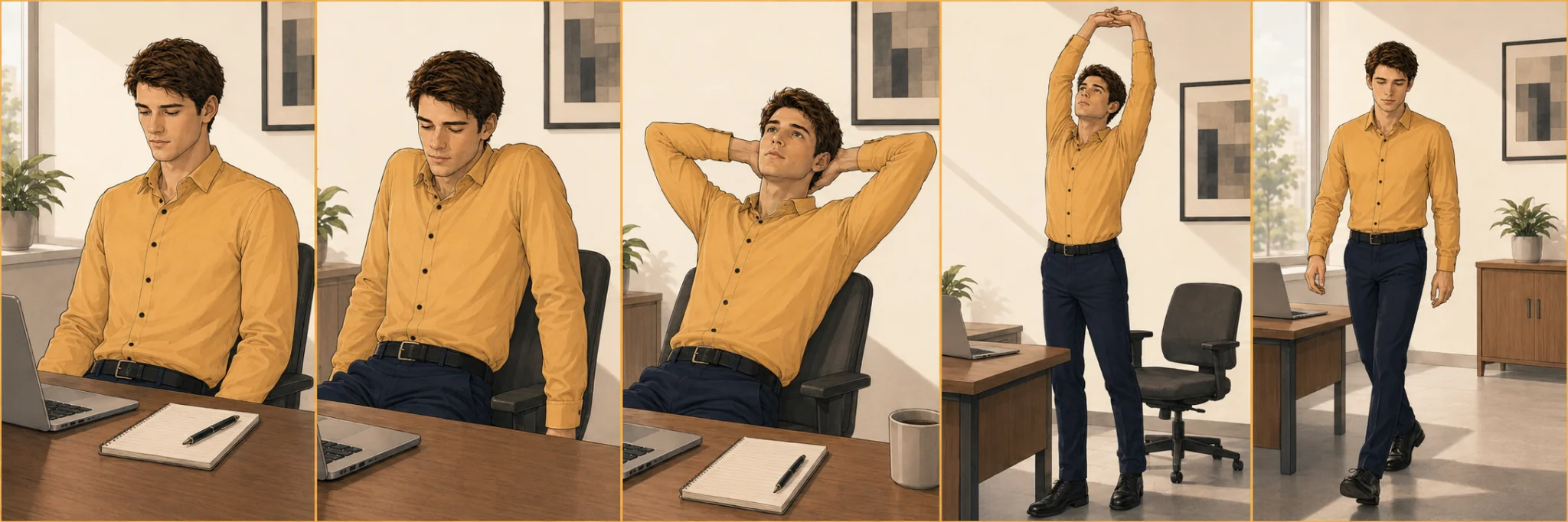
- Chin tuck — 20 seconds. Sit or stand tall. Gently draw your chin straight back, like making a soft double chin. Keep your eyes level; don’t force the head down. If you have a diagnosed neck (cervical) problem, or this brings on pain or tingling into the arm, skip it. Why: it eases you out of the forward-head position.
- Shoulder rolls — 20 seconds. Roll your shoulders slowly up, back, and down, then reverse. Why: it returns movement to an area that stays tense and still while you type.
- Upper-back opening — 30 seconds. Hands behind your head or on the back of your chair, gently lift the chest and open through the upper back. Don’t crank the lower back. Why: it gives your upper spine a break from the rounded desk shape.
- Overhead reach — 20 seconds. Stand and reach both arms overhead. Breathe in, then exhale and let the shoulders drop. Why: it changes your whole-body position, not just the neck.
- Short walk — 30 seconds. Walk to the door, the window, or across the room. Why: walking breaks the static pattern better than another seated adjustment.
About two minutes total. The goal isn’t to “fix” your neck in two minutes — it’s to stop repeating the same position without a break.
11. What not to do
- Don’t chase perfect posture. A perfect pose held too long just becomes another static pose. Your body needs variety more than one heroic position.
- Don’t keep stretching harder. More force isn’t better. Sharp pain, symptoms spreading into the arm, numbness, or dizziness means stop and get advice.
- Don’t blame the chair for everything. It matters — but so does your work pattern.
- Don’t ignore workload. Long computer hours, high demands, low support, and stress all shape how your body feels. The research on computer workers ties neck and shoulder pain to several work-related factors, not posture alone.
- Don’t wait until the end of the day. If your neck always hurts at 5 p.m., the useful change probably needs to happen at 10 a.m.
12. When should I get professional help?
Most mild desk-related stiffness isn’t an emergency — but you shouldn’t self-manage everything. Speak with a qualified health professional if your neck pain is severe, is getting worse, spreads into your arm, comes with numbness or weakness, follows an injury, comes with dizziness or unusual symptoms, doesn’t improve over time, or keeps returning despite reasonable changes.
This isn’t meant to scare you. It’s simply the line between everyday self-care and needing an individual assessment. LibraryFit can guide habits; a qualified professional should assess persistent or concerning symptoms.
FAQ
Is my neck pain from computer work always caused by posture? No. Posture can contribute, but neck discomfort often comes from a repeated pattern: screen focus, stillness, workstation setup, stress, low movement, and sometimes a lack of strength.
Can a better chair fix my neck pain? It can help, especially if your current setup encourages awkward positions. But a chair can’t replace movement, variation, or strength.
How often should I move? There’s no perfect number. A practical start is to interrupt long work blocks before stiffness builds — even one to two minutes can change the signal your body is getting.
Are movement breaks proven to cure neck pain? No. The evidence for break schedules reducing neck pain on their own is limited. Breaks work best as part of a broader approach that includes setup, movement variety, and strengthening.
Should I stretch or strengthen? Both have a place. Stretching can ease short-term stiffness. Strengthening has clearer support for office workers with neck pain — especially targeted neck and shoulder work.
What’s the first thing I should do tomorrow? Raise your screen if it’s too low, bring your keyboard and mouse closer, relax your shoulders, and take a two-minute reset before your neck starts hurting.
The takeaway
Your neck probably doesn’t hurt because you failed to sit perfectly. It hurts because your workday keeps asking your body to repeat the same narrow pattern: look forward, reach forward, sit still, hold the shoulders, move very little — for hours.
The answer isn’t fear, and it isn’t a perfect posture. It’s a better pattern: make the workstation less stressful, interrupt stillness earlier, move the upper back and shoulders more often, build simple strength over time, and pay attention when symptoms don’t behave normally.
The goal isn’t to become a perfect sitter. It’s to become a less static worker. That’s where real desk health begins.

Want the full system?
If you sit for work most days, don’t start with a complicated fitness plan. Start with one repeatable change: two minutes of movement, one better screen position, one earlier break, one small strengthening habit. Desk Athlete Reset is built on exactly that idea — simple movement, real research, and no-gym strategies for people who sit too much.
What to read next
- For why unbroken sitting creates the pattern behind neck discomfort, read Sitting Is Not the Enemy — Uninterrupted Sitting Is.
- For the science behind short movement breaks and how often to take them, read The Science of Two-Minute Movement Breaks.
- For a practical guide to exercise snacks you can do at your desk, read Exercise Snacks for People With No Time.
Sources
- Behzad A, Kim E, Chung J. (2026). Prolonged sitting in office environments: a scoping review of assessment methods. Work: A Journal of Prevention, Assessment and Rehabilitation, 84(1), 20–41. doi:10.1177/10519815251396853
- Kaliniene G, Ustinaviciene R, Skemiene L, Vaiciulis V, Vasilavicius P. (2016). Associations between musculoskeletal pain and work-related factors among public service sector computer workers in Kaunas County, Lithuania. BMC Musculoskeletal Disorders, 17, 420. doi:10.1186/s12891-016-1281-7
- Rodrigues MS, Leite RDV, Lelis CM, Chaves TC. (2017). Differences in ergonomic and workstation factors between computer office workers with and without reported musculoskeletal pain. Work, 57(4), 563–572. PubMed: 28826196
- Chen X, Coombes BK, Sjøgaard G, Jun D, O’Leary S, Johnston V. (2018). Workplace-based interventions for neck pain in office workers: a systematic review and meta-analysis. Physical Therapy, 98(1), 40–62. doi:10.1093/ptj/pzx101
- Louw S, Makwela S, Manas L, Meyer L, Terblanche D, Brink Y. (2017). Effectiveness of exercise in office workers with neck pain: a systematic review and meta-analysis. South African Journal of Physiotherapy, 73(1), a392. doi:10.4102/sajp.v73i1.392
- Luger T, Ferenchak SA, Rieger MA, Steinhilber B. (2025). Work-break interventions for preventing musculoskeletal symptoms and disorders in healthy workers. Cochrane Database of Systematic Reviews, Issue 10, CD012886. doi:10.1002/14651858.CD012886.pub3
FREE TOOLKIT
The Desk Athlete Toolkit
Six printable movement cards you can do right at your desk — no gym, no equipment. One card for every workday moment.
Get the free toolkit